Upload attachments
In this guide, you will learn how to upload file attachments to Fatture in Cloud using the API; this is a tricky operation, so you'll need to fill out the request properly to make it work. We'll use the Taxes API (F24) as an example, but the process is similar for other endpoints that support file uploads.
In this example, we'll suppose you have to manage just one Company, so we simply inserted its ID directly in the code. If, instead, you need to be able to manage multiple companies, you'll need to retrieve the ID of the current company in some way.
Check the Company-scoped Methods page for more info.
👣 File Upload Process
In order to attach a file to a Fatture in Cloud document, you need to follow this two-step procedure:
- Upload the file and retrieve the attachment token;
- Use the attachment token to link the uploaded file to the desired entity (like an invoice or receipt) in the Create or Update request of your document type.
In the Taxes API (F24) use case, this process can be translated into the following steps:
- Use the Upload F24 Attachment method to upload the file and get the
attachment_token - Use the
attachment_tokenin the Create F24 or Modify F24 methods to link the uploaded file to the F24 document.
🍬 Supported Endpoints
Currently, the available Upload Attachment endpoints are the following:
- Upload Archive Document Attachment
- Upload Issued Document Attachment
- Upload Received Document Attachment
- Upload F24 Attachment
The following examples will focus on the Upload F24 Attachment endpoint, but the process is similar for the other endpoints.
⚙ Code Examples
In this paragraph, we'll provide vanilla code examples showing how to upload attachments using different programming languages.
Please note that the SDKs will make this process much easier to implement, as they already handle multipart/form-data requests internally. You can find SDK code examples in the Invoice Creation guide or in the SDKs Readme files (check the GitHub repositories).
It seems that C# SDK's Readme is providing a broken code example based on MemoryStream, resulting in the "Extension not valid" error.
We suggest you check the Invoice Creation guide provided above for a working example.
You can also refer to the following GitHub pages for more info:
The attachment upload process requires sending a POST request with multipart/form-data encoding, including the file content and the filename as separate fields.
Your REST clients could also provide built-in support for multipart requests, so please check their documentation for more details.
Here are examples showing how to upload attachments using different programming languages:
- C#
- Go
- Java
- JavaScript
- PHP
- Python
- Ruby
- TypeScript
- Zapier
using System;
using System.IO;
using System.Net.Http;
using System.Threading.Tasks;
using Newtonsoft.Json;

namespace FattureInCloud.Taxes
{
    public class AttachmentData
    {
        [JsonProperty("attachment_token")]
        public string AttachmentToken { get; set; }
    }

    public class UploadF24AttachmentResponse
    {
        [JsonProperty("data")]
        public AttachmentData Data { get; set; }
    }

    public class TaxesAttachmentClient
    {
        private readonly HttpClient _httpClient;
        private readonly string _baseUrl;
        private readonly string _accessToken;

        public TaxesAttachmentClient(string accessToken, string baseUrl = "https://api-v2.fattureincloud.it")
        {
            _accessToken = accessToken ?? throw new ArgumentNullException(nameof(accessToken));
            _baseUrl = baseUrl;
            _httpClient = new HttpClient();
            _httpClient.DefaultRequestHeaders.Add("Authorization", $"Bearer {_accessToken}");
        }

        public async Task<UploadF24AttachmentResponse> UploadTaxesAttachmentAsync(
            int companyId,
            string filePath,
            string filename = null)
        {
            if (string.IsNullOrEmpty(filePath))
                throw new ArgumentNullException(nameof(filePath));

            if (!File.Exists(filePath))
                throw new FileNotFoundException($"File not found: {filePath}");

            try
            {
                // If filename is not specified, use the file name
                if (string.IsNullOrEmpty(filename))
                    filename = Path.GetFileName(filePath);

                // Create multipart/form-data content
                using var form = new MultipartFormDataContent();

                // Add the file
                var fileStream = File.OpenRead(filePath);
                var fileContent = new StreamContent(fileStream);
                fileContent.Headers.ContentType = new System.Net.Http.Headers.MediaTypeHeaderValue("application/octet-stream");
                form.Add(fileContent, "attachment", filename);

                // Add filename as a separate field
                form.Add(new StringContent(filename), "filename");

                // Endpoint URL
                string url = $"{_baseUrl}/c/{companyId}/taxes/attachment";

                // Make the POST request
                var response = await _httpClient.PostAsync(url, form);

                // Verify that the response is successful
                response.EnsureSuccessStatusCode();

                // Read and deserialize the response
                string jsonResponse = await response.Content.ReadAsStringAsync();
                var result = JsonConvert.DeserializeObject<UploadF24AttachmentResponse>(jsonResponse);

                Console.WriteLine("Upload completed successfully!");
                Console.WriteLine($"Attachment token: {result.Data?.AttachmentToken}");

                return result;
            }
            catch (HttpRequestException ex)
            {
                Console.WriteLine($"HTTP error during upload: {ex.Message}");
                throw;
            }
            catch (Exception ex)
            {
                Console.WriteLine($"Error during upload: {ex.Message}");
                throw;
            }
        }

        public void Dispose()
        {
            _httpClient?.Dispose();
        }
    }

    class Program
    {
        static async Task Main(string[] args)
        {
            const int companyId = 12345; // Replace with your company ID
            const string filePath = "./invoice.pdf"; // Path to the file to upload
            const string filename = "invoice.pdf";
            const string accessToken = "YOUR_ACCESS_TOKEN"; // Replace with your token

            var client = new TaxesAttachmentClient(accessToken);

            try
            {
                var result = await client.UploadTaxesAttachmentAsync(companyId, filePath, filename);
                Console.WriteLine($"Result: {JsonConvert.SerializeObject(result, Formatting.Indented)}");
            }
            catch (Exception ex)
            {
                Console.WriteLine($"Error: {ex.Message}");
            }
            finally
            {
                client.Dispose();
            }
        }
    }
}
package main

import (
	"bytes"
	"encoding/json"
	"fmt"
	"io"
	"mime/multipart"
	"net/http"
	"os"
)

// AttachmentData represents the attachment data returned by the API
type AttachmentData struct {
	AttachmentToken string `json:"attachment_token"`
}

// UploadF24AttachmentResponse represents the API response for F24 attachment upload
type UploadF24AttachmentResponse struct {
	Data *AttachmentData `json:"data"`
}

// TaxesAttachmentClient handles F24 attachment uploads
type TaxesAttachmentClient struct {
	BaseURL     string
	AccessToken string
	HTTPClient  *http.Client
}

// NewTaxesAttachmentClient creates a new client for taxes attachment operations
func NewTaxesAttachmentClient(accessToken string) *TaxesAttachmentClient {
	return &TaxesAttachmentClient{
		BaseURL:     "https://api-v2.fattureincloud.it",
		AccessToken: accessToken,
		HTTPClient:  &http.Client{},
	}
}

// UploadTaxesAttachment uploads an attachment for F24 documents
func (c *TaxesAttachmentClient) UploadTaxesAttachment(companyID int, filePath string, filename string) (*UploadF24AttachmentResponse, error) {
	if filePath == "" {
		return nil, fmt.Errorf("filePath cannot be empty")
	}

	// Check if file exists
	if _, err := os.Stat(filePath); os.IsNotExist(err) {
		return nil, fmt.Errorf("file not found: %s", filePath)
	}

	// Open the file
	file, err := os.Open(filePath)
	if err != nil {
		return nil, fmt.Errorf("failed to open file: %w", err)
	}
	defer file.Close()

	// Create multipart form data
	var body bytes.Buffer
	writer := multipart.NewWriter(&body)

	// Add file part
	part, err := writer.CreateFormFile("attachment", filename)
	if err != nil {
		return nil, fmt.Errorf("failed to create form file: %w", err)
	}

	_, err = io.Copy(part, file)
	if err != nil {
		return nil, fmt.Errorf("failed to copy file content: %w", err)
	}

	// Add filename field
	err = writer.WriteField("filename", filename)
	if err != nil {
		return nil, fmt.Errorf("failed to write filename field: %w", err)
	}

	// Close the writer
	err = writer.Close()
	if err != nil {
		return nil, fmt.Errorf("failed to close multipart writer: %w", err)
	}

	// Create the request
	url := fmt.Sprintf("%s/c/%d/taxes/attachment", c.BaseURL, companyID)
	req, err := http.NewRequest("POST", url, &body)
	if err != nil {
		return nil, fmt.Errorf("failed to create request: %w", err)
	}

	// Set headers
	req.Header.Set("Content-Type", writer.FormDataContentType())
	req.Header.Set("Authorization", fmt.Sprintf("Bearer %s", c.AccessToken))

	// Execute the request
	resp, err := c.HTTPClient.Do(req)
	if err != nil {
		return nil, fmt.Errorf("failed to execute request: %w", err)
	}
	defer resp.Body.Close()

	// Check status code
	if resp.StatusCode != http.StatusOK {
		bodyBytes, _ := io.ReadAll(resp.Body)
		return nil, fmt.Errorf("API request failed with status %d: %s", resp.StatusCode, string(bodyBytes))
	}

	// Read and parse response
	var result UploadF24AttachmentResponse
	err = json.NewDecoder(resp.Body).Decode(&result)
	if err != nil {
		return nil, fmt.Errorf("failed to decode response: %w", err)
	}

	fmt.Println("Upload completed successfully!")
	if result.Data != nil {
		fmt.Printf("Attachment token: %s\n", result.Data.AttachmentToken)
	}

	return &result, nil
}

func main() {
	const (
		companyID   = 12345          // Replace with your company ID
		filePath    = "./invoice.pdf" // Path to the file to upload
		filename    = "invoice.pdf"
		accessToken = "YOUR_ACCESS_TOKEN" // Replace with your access token
	)

	client := NewTaxesAttachmentClient(accessToken)

	result, err := client.UploadTaxesAttachment(companyID, filePath, filename)
	if err != nil {
		fmt.Printf("Error: %v\n", err)
		return
	}

	// Pretty print the result
	resultJSON, err := json.MarshalIndent(result, "", "  ")
	if err != nil {
		fmt.Printf("Error marshaling result: %v\n", err)
		return
	}

	fmt.Printf("Result: %s\n", string(resultJSON))
}
package com.fattureincloud.taxes;

import com.fasterxml.jackson.annotation.JsonProperty;
import com.fasterxml.jackson.databind.ObjectMapper;

import java.io.File;
import java.io.IOException;
import java.net.URI;
import java.net.http.HttpClient;
import java.net.http.HttpRequest;
import java.net.http.HttpResponse;
import java.nio.file.Files;
import java.time.Duration;

/**
 * Represents the attachment data returned by the API
 */
class AttachmentData {
    @JsonProperty("attachment_token")
    private String attachmentToken;

    @JsonProperty("download_url")
    private String downloadUrl;

    public String getAttachmentToken() {
        return attachmentToken;
    }

    public void setAttachmentToken(String attachmentToken) {
        this.attachmentToken = attachmentToken;
    }

    public String getDownloadUrl() {
        return downloadUrl;
    }

    public void setDownloadUrl(String downloadUrl) {
        this.downloadUrl = downloadUrl;
    }
}

/**
 * Represents the API response for F24 attachment upload
 */
class UploadF24AttachmentResponse {
    @JsonProperty("data")
    private AttachmentData data;

    public AttachmentData getData() {
        return data;
    }

    public void setData(AttachmentData data) {
        this.data = data;
    }
}

/**
 * Client for uploading F24 attachments
 */
public class TaxesAttachmentClient {
    private final String baseUrl;
    private final String accessToken;
    private final HttpClient httpClient;
    private final ObjectMapper objectMapper;

    public TaxesAttachmentClient(String accessToken) {
        this(accessToken, "https://api-v2.fattureincloud.it");
    }

    public TaxesAttachmentClient(String accessToken, String baseUrl) {
        if (accessToken == null || accessToken.isEmpty()) {
            throw new IllegalArgumentException("Access token cannot be null or empty");
        }
        this.accessToken = accessToken;
        this.baseUrl = baseUrl;
        this.httpClient = HttpClient.newBuilder()
                .connectTimeout(Duration.ofSeconds(30))
                .build();
        this.objectMapper = new ObjectMapper();
    }

    /**
     * Uploads an attachment for F24 documents
     *
     * @param companyId ID of the company
     * @param filePath Path to the file to upload
     * @param filename Name of the file
     * @return API response with attachment token
     * @throws IOException if an error occurs during upload
     * @throws InterruptedException if the request is interrupted
     */
    public UploadF24AttachmentResponse uploadTaxesAttachment(int companyId, String filePath, String filename)
            throws IOException, InterruptedException {

        if (filePath == null || filePath.isEmpty()) {
            throw new IllegalArgumentException("File path cannot be null or empty");
        }

        File file = new File(filePath);
        if (!file.exists()) {
            throw new IOException("File not found: " + filePath);
        }

        // Create multipart form data
        String boundary = "----FormBoundary" + System.currentTimeMillis();
        String multipartBody = createMultipartBody(file, filename, boundary);

        // Build the request
        String url = String.format("%s/c/%d/taxes/attachment", baseUrl, companyId);
        HttpRequest request = HttpRequest.newBuilder()
                .uri(URI.create(url))
                .header("Authorization", "Bearer " + accessToken)
                .header("Content-Type", "multipart/form-data; boundary=" + boundary)
                .POST(HttpRequest.BodyPublishers.ofString(multipartBody))
                .build();

        // Execute the request
        HttpResponse<String> response = httpClient.send(request, HttpResponse.BodyHandlers.ofString());

        // Check status code
        if (response.statusCode() != 200) {
            throw new IOException("API request failed with status " + response.statusCode() + ": " + response.body());
        }

        // Parse the response
        UploadF24AttachmentResponse result = objectMapper.readValue(response.body(), UploadF24AttachmentResponse.class);

        System.out.println("Upload completed successfully!");
        if (result.getData() != null) {
            System.out.println("Attachment token: " + result.getData().getAttachmentToken());
        }

        return result;
    }

    private String createMultipartBody(File file, String filename, String boundary) throws IOException {
        StringBuilder builder = new StringBuilder();
        String lineBreak = "\r\n";

        // Add file field
        builder.append("--").append(boundary).append(lineBreak);
        builder.append("Content-Disposition: form-data; name=\"attachment\"; filename=\"").append(filename).append("\"").append(lineBreak);
        builder.append("Content-Type: application/octet-stream").append(lineBreak);
        builder.append(lineBreak);

        // Add file content as base64 (simplified approach)
        byte[] fileContent = Files.readAllBytes(file.toPath());
        String base64Content = java.util.Base64.getEncoder().encodeToString(fileContent);
        builder.append(base64Content).append(lineBreak);

        // Add filename field
        builder.append("--").append(boundary).append(lineBreak);
        builder.append("Content-Disposition: form-data; name=\"filename\"").append(lineBreak);
        builder.append(lineBreak);
        builder.append(filename).append(lineBreak);

        // Close boundary
        builder.append("--").append(boundary).append("--").append(lineBreak);

        return builder.toString();
    }

    /**
     * Example usage
     */
    public static void main(String[] args) {
        final int companyId = 12345; // Replace with your company ID
        final String filePath = "./invoice.pdf"; // Path to the file to upload
        final String filename = "invoice.pdf";
        final String accessToken = "YOUR_ACCESS_TOKEN"; // Replace with your access token

        TaxesAttachmentClient client = new TaxesAttachmentClient(accessToken);

        try {
            UploadF24AttachmentResponse result = client.uploadTaxesAttachment(companyId, filePath, filename);

            ObjectMapper mapper = new ObjectMapper();
            String resultJson = mapper.writerWithDefaultPrettyPrinter().writeValueAsString(result);
            System.out.println("Result: " + resultJson);

        } catch (Exception e) {
            System.err.println("Error: " + e.getMessage());
            e.printStackTrace();
        }
    }
}
const axios = require("axios");
const FormData = require("form-data");
const fs = require("fs");

async function uploadTaxesAttachment(companyId, filePath, filename) {
  try {
    // Create a FormData object for multipart/form-data
    const formData = new FormData();

    // Add the file to form data
    formData.append("attachment", fs.createReadStream(filePath));
    formData.append("filename", filename || "attachment.pdf");

    // Request configuration
    const config = {
      method: "post",
      url: `https://api-v2.fattureincloud.it/c/${companyId}/taxes/attachment`,
      headers: {
        Authorization: "Bearer YOUR_ACCESS_TOKEN", // Replace with your token
        "Content-Type": "multipart/form-data",
        ...formData.getHeaders(), // Required headers for multipart
      },
      data: formData,
    };

    // Make the request
    const response = await axios(config);

    console.log("Upload completed successfully!");
    console.log("Attachment token:", response.data.data.attachment_token);

    return response.data;
  } catch (error) {
    console.error("Upload error:", error.response?.data || error.message);
    throw error;
  }
}

// Usage example
async function main() {
  const companyId = 12345; // Replace with your company ID
  const filePath = "./invoice.pdf"; // Path to the file to upload
  const filename = "invoice.pdf";

  try {
    const result = await uploadTaxesAttachment(companyId, filePath, filename);
    console.log("Result:", result);
  } catch (error) {
    console.error("Error:", error);
  }
}

main();
<?php

namespace FattureInCloud\Taxes;

/**
 * Represents the attachment data returned by the API
 */
class AttachmentData
{
    public ?string $attachmentToken;

    public function __construct(?string $attachmentToken = null)
    {
        $this->attachmentToken = $attachmentToken;
    }

    public static function fromArray(array $data): self
    {
        return new self($data['attachment_token'] ?? null);
    }

    public function toArray(): array
    {
        return [
            'attachment_token' => $this->attachmentToken
        ];
    }
}

/**
 * Represents the API response for F24 attachment upload
 */
class UploadF24AttachmentResponse
{
    public ?AttachmentData $data;

    public function __construct(?AttachmentData $data = null)
    {
        $this->data = $data;
    }

    public static function fromArray(array $response): self
    {
        $data = isset($response['data']) ? AttachmentData::fromArray($response['data']) : null;
        return new self($data);
    }

    public function toArray(): array
    {
        return [
            'data' => $this->data ? $this->data->toArray() : null
        ];
    }
}

/**
 * Client for uploading F24 attachments
 */
class TaxesAttachmentClient
{
    private string $baseUrl;
    private string $accessToken;
    private int $timeout;

    public function __construct(string $accessToken, string $baseUrl = 'https://api-v2.fattureincloud.it', int $timeout = 30)
    {
        if (empty($accessToken)) {
            throw new \InvalidArgumentException('Access token cannot be empty');
        }

        $this->accessToken = $accessToken;
        $this->baseUrl = rtrim($baseUrl, '/');
        $this->timeout = $timeout;
    }

    /**
     * Uploads an attachment for F24 documents
     *
     * @param int $companyId ID of the company
     * @param string $filePath Path to the file to upload
     * @param string $filename Name of the file
     * @return UploadF24AttachmentResponse API response with attachment token
     * @throws \Exception if an error occurs during upload
     */
    public function uploadTaxesAttachment(int $companyId, string $filePath, string $filename): UploadF24AttachmentResponse
    {
        if (empty($filePath)) {
            throw new \InvalidArgumentException('File path cannot be empty');
        }

        if (empty($filename)) {
            throw new \InvalidArgumentException('Filename cannot be empty');
        }

        if (!file_exists($filePath)) {
            throw new \Exception("File not found: {$filePath}");
        }

        if (!is_readable($filePath)) {
            throw new \Exception("File is not readable: {$filePath}");
        }

        // Create multipart form data
        $boundary = '----FormBoundary' . uniqid();
        $postData = $this->createMultipartBody($filePath, $filename, $boundary);

        // Prepare headers
        $headers = [
            'Authorization: Bearer ' . $this->accessToken,
            'Content-Type: multipart/form-data; boundary=' . $boundary,
            'Content-Length: ' . strlen($postData)
        ];

        // Build URL
        $url = "{$this->baseUrl}/c/{$companyId}/taxes/attachment";

        // Initialize cURL
        $curl = curl_init();

        if ($curl === false) {
            throw new \Exception('Failed to initialize cURL');
        }

        // Set cURL options
        curl_setopt_array($curl, [
            CURLOPT_URL => $url,
            CURLOPT_RETURNTRANSFER => true,
            CURLOPT_POST => true,
            CURLOPT_POSTFIELDS => $postData,
            CURLOPT_HTTPHEADER => $headers,
            CURLOPT_TIMEOUT => $this->timeout,
            CURLOPT_CONNECTTIMEOUT => 10,
            CURLOPT_SSL_VERIFYPEER => true,
            CURLOPT_SSL_VERIFYHOST => 2,
            CURLOPT_FOLLOWLOCATION => false
        ]);

        // Execute request
        $response = curl_exec($curl);
        $httpCode = curl_getinfo($curl, CURLINFO_HTTP_CODE);
        $error = curl_error($curl);

        curl_close($curl);

        if ($response === false) {
            throw new \Exception("cURL error: {$error}");
        }

        // Check HTTP status code
        if ($httpCode !== 200) {
            throw new \Exception("API request failed with status {$httpCode}: {$response}");
        }

        // Parse JSON response
        $responseData = json_decode($response, true);

        if (json_last_error() !== JSON_ERROR_NONE) {
            throw new \Exception('Failed to parse JSON response: ' . json_last_error_msg());
        }

        $result = UploadF24AttachmentResponse::fromArray($responseData);

        echo "Upload completed successfully!\n";
        if ($result->data && $result->data->attachmentToken) {
            echo "Attachment token: {$result->data->attachmentToken}\n";
        }

        return $result;
    }

    private function createMultipartBody(string $filePath, string $filename, string $boundary): string
    {
        $fileContent = file_get_contents($filePath);
        if ($fileContent === false) {
            throw new \Exception("Failed to read file: {$filePath}");
        }

        $body = '';
        $lineBreak = "\r\n";

        // Add file field
        $body .= "--{$boundary}{$lineBreak}";
        $body .= "Content-Disposition: form-data; name=\"attachment\"; filename=\"{$filename}\"{$lineBreak}";
        $body .= "Content-Type: application/octet-stream{$lineBreak}";
        $body .= $lineBreak;
        $body .= $fileContent;
        $body .= $lineBreak;

        // Add filename field
        $body .= "--{$boundary}{$lineBreak}";
        $body .= "Content-Disposition: form-data; name=\"filename\"{$lineBreak}";
        $body .= $lineBreak;
        $body .= $filename;
        $body .= $lineBreak;

        // Close boundary
        $body .= "--{$boundary}--{$lineBreak}";

        return $body;
    }
}

/**
 * Example usage
 */
function main(): void
{
    $companyId = 12345; // Replace with your company ID
    $filePath = './invoice.pdf'; // Path to the file to upload
    $filename = 'invoice.pdf';
    $accessToken = 'YOUR_ACCESS_TOKEN'; // Replace with your access token

    $client = new TaxesAttachmentClient($accessToken);

    try {
        $result = $client->uploadTaxesAttachment($companyId, $filePath, $filename);

        echo "Result: " . json_encode($result->toArray(), JSON_PRETTY_PRINT) . "\n";

    } catch (\Exception $e) {
        echo "Error: " . $e->getMessage() . "\n";
        exit(1);
    }
}
import json
import requests
from dataclasses import dataclass
from typing import Optional, Dict, Any
from pathlib import Path


@dataclass
class AttachmentData:
    """Represents the attachment data returned by the API"""
    attachment_token: Optional[str] = None

    @classmethod
    def from_dict(cls, data: Dict[str, Any]) -> 'AttachmentData':
        return cls(attachment_token=data.get('attachment_token'))

    def to_dict(self) -> Dict[str, Any]:
        return {'attachment_token': self.attachment_token}


@dataclass
class UploadF24AttachmentResponse:
    """Represents the API response for F24 attachment upload"""
    data: Optional[AttachmentData] = None

    @classmethod
    def from_dict(cls, response: Dict[str, Any]) -> 'UploadF24AttachmentResponse':
        data = None
        if 'data' in response and response['data']:
            data = AttachmentData.from_dict(response['data'])
        return cls(data=data)

    def to_dict(self) -> Dict[str, Any]:
        return {'data': self.data.to_dict() if self.data else None}


class TaxesAttachmentClient:
    """Client for uploading F24 attachments"""

    def __init__(self, access_token: str, base_url: str = "https://api-v2.fattureincloud.it", timeout: int = 30):
        """
        Initialize the client

        Args:
            access_token: Bearer token for API authentication
            base_url: Base URL for the API (default: https://api-v2.fattureincloud.it)
            timeout: Request timeout in seconds (default: 30)
        """
        if not access_token:
            raise ValueError("Access token cannot be empty")

        self.access_token = access_token
        self.base_url = base_url.rstrip('/')
        self.timeout = timeout
        self.session = requests.Session()
        self.session.headers.update({
            'Authorization': f'Bearer {access_token}'
        })

    def upload_taxes_attachment(self, company_id: int, file_path: str, filename: str) -> UploadF24AttachmentResponse:
        """
        Uploads an attachment for F24 documents

        Args:
            company_id: ID of the company
            file_path: Path to the file to upload
            filename: Name of the file

        Returns:
            UploadF24AttachmentResponse: API response with attachment token

        Raises:
            ValueError: If parameters are invalid
            FileNotFoundError: If file doesn't exist
            requests.RequestException: If API request fails
            Exception: For other errors
        """
        if not file_path:
            raise ValueError("File path cannot be empty")

        if not filename:
            raise ValueError("Filename cannot be empty")

        file_path_obj = Path(file_path)
        if not file_path_obj.exists():
            raise FileNotFoundError(f"File not found: {file_path}")

        if not file_path_obj.is_file():
            raise ValueError(f"Path is not a file: {file_path}")

        try:
            # Prepare multipart form data
            with open(file_path_obj, 'rb') as file:
                files = {
                    'attachment': (filename, file, 'application/octet-stream')
                }
                data = {
                    'filename': filename
                }

                # Build URL
                url = f"{self.base_url}/c/{company_id}/taxes/attachment"

                # Make the request
                response = self.session.post(
                    url,
                    files=files,
                    data=data,
                    timeout=self.timeout
                )

                # Check status code
                response.raise_for_status()

                # Parse JSON response
                response_data = response.json()
                result = UploadF24AttachmentResponse.from_dict(response_data)

                print("Upload completed successfully!")
                if result.data and result.data.attachment_token:
                    print(f"Attachment token: {result.data.attachment_token}")

                return result

        except requests.RequestException as e:
            raise requests.RequestException(f"API request failed: {str(e)}") from e
        except json.JSONDecodeError as e:
            raise Exception(f"Failed to parse JSON response: {str(e)}") from e
        except Exception as e:
            raise Exception(f"Error during upload: {str(e)}") from e

    def __enter__(self):
        """Context manager entry"""
        return self

    def __exit__(self, exc_type, exc_val, exc_tb):
        """Context manager exit - close session"""
        self.session.close()


def main() -> None:
    """Example usage"""
    company_id = 12345  # Replace with your company ID
    file_path = "./invoice.pdf"  # Path to the file to upload
    filename = "invoice.pdf"
    access_token = "YOUR_ACCESS_TOKEN"  # Replace with your access token

    try:
        with TaxesAttachmentClient(access_token) as client:
            result = client.upload_taxes_attachment(company_id, file_path, filename)

            print("Result:")
            print(json.dumps(result.to_dict(), indent=2))

    except Exception as e:
        print(f"Error: {e}")
        exit(1)


if __name__ == "__main__":
    main()
#!/usr/bin/env ruby

require 'net/http'
require 'uri'
require 'json'

# Represents the attachment data returned by the API

class AttachmentData
attr_accessor :attachment_token

def initialize(attachment_token = nil)
@attachment_token = attachment_token
end

def self.from_hash(data)
new(data['attachment_token'])
end

def to_hash
{ 'attachment_token' => @attachment_token }
end
end

# Represents the API response for F24 attachment upload

class UploadF24AttachmentResponse
attr_accessor :data

def initialize(data = nil)
@data = data
end

def self.from_hash(response)
data = response['data'] ? AttachmentData.from_hash(response['data']) : nil
new(data)
end

def to_hash
{ 'data' => @data ? @data.to_hash : nil }
end
end

# Client for uploading F24 attachments

class TaxesAttachmentClient
def initialize(access_token, base_url = 'https://api-v2.fattureincloud.it', timeout = 30)
raise ArgumentError, 'Access token cannot be empty' if access_token.nil? || access_token.empty?

    @access_token = access_token
    @base_url = base_url.chomp('/')
    @timeout = timeout

end

# Uploads an attachment for F24 documents

#

# @param company_id [Integer] ID of the company

# @param file_path [String] Path to the file to upload

# @param filename [String] Name of the file

# @return [UploadF24AttachmentResponse] API response with attachment token

# @raise [ArgumentError] If parameters are invalid

# @raise [Errno::ENOENT] If file doesn't exist

# @raise [StandardError] For other errors

def upload_taxes_attachment(company_id, file_path, filename)
raise ArgumentError, 'File path cannot be empty' if file_path.nil? || file_path.empty?
raise ArgumentError, 'Filename cannot be empty' if filename.nil? || filename.empty?
raise Errno::ENOENT, "File not found: #{file_path}" unless File.exist?(file_path)
raise ArgumentError, "Path is not a file: #{file_path}" unless File.file?(file_path)

    # Create multipart form data
    boundary = "----FormBoundary#{Time.now.to_i}#{rand(1000)}"
    body = create_multipart_body(file_path, filename, boundary)

    # Build URL
    url = URI("#{@base_url}/c/#{company_id}/taxes/attachment")

    # Create HTTP request
    http = Net::HTTP.new(url.host, url.port)
    http.use_ssl = url.scheme == 'https'
    http.read_timeout = @timeout
    http.open_timeout = 10

    request = Net::HTTP::Post.new(url)
    request['Authorization'] = "Bearer #{@access_token}"
    request['Content-Type'] = "multipart/form-data; boundary=#{boundary}"
    request.body = body

    begin
      response = http.request(request)

      unless response.code == '200'
        raise StandardError, "API request failed with status #{response.code}: #{response.body}"
      end

      # Parse JSON response
      response_data = JSON.parse(response.body)
      result = UploadF24AttachmentResponse.from_hash(response_data)

      puts 'Upload completed successfully!'
      if result.data && result.data.attachment_token
        puts "Attachment token: #{result.data.attachment_token}"
      end

      result
    rescue JSON::ParserError => e
      raise StandardError, "Failed to parse JSON response: #{e.message}"
    rescue => e
      raise StandardError, "Error during upload: #{e.message}"
    end

end

private

def create_multipart_body(file_path, filename, boundary)
file_content = File.binread(file_path)
mime_type = 'application/octet-stream' # Default MIME type

    body = ''
    line_break = "\r\n"

    # Add file field
    body += "--#{boundary}#{line_break}"
    body += "Content-Disposition: form-data; name=\"attachment\"; filename=\"#{filename}\"#{line_break}"
    body += "Content-Type: #{mime_type}#{line_break}"
    body += line_break
    body += file_content
    body += line_break

    # Add filename field
    body += "--#{boundary}#{line_break}"
    body += "Content-Disposition: form-data; name=\"filename\"#{line_break}"
    body += line_break
    body += filename
    body += line_break

    # Close boundary
    body += "--#{boundary}--#{line_break}"

    body

end
end

# Example usage

def main
company_id = 12345 # Replace with your company ID
file_path = './invoice.pdf' # Path to the file to upload
filename = 'invoice.pdf'
access_token = 'YOUR_ACCESS_TOKEN' # Replace with your access token

client = TaxesAttachmentClient.new(access_token)

begin
result = client.upload_taxes_attachment(company_id, file_path, filename)

    puts 'Result:'
    puts JSON.pretty_generate(result.to_hash)

rescue => e
puts "Error: #{e.message}"
exit(1)
end
end

# Run the example if this file is executed directly

main if **FILE** == $PROGRAM_NAME
import * as fs from 'fs';
import * as path from 'path';
import FormData from 'form-data';
import fetch from 'node-fetch';

/**
 * Represents the attachment data returned by the API
 */
interface AttachmentData {
    attachment_token?: string | null;
}

/**
 * Represents the API response for F24 attachment upload
 */
interface UploadF24AttachmentResponse {
    data?: AttachmentData | null;
}

/**
 * Configuration options for the TaxesAttachmentClient
 */
interface ClientConfig {
    baseUrl?: string;
    timeout?: number;
}

/**
 * Client for uploading F24 attachments (Node.js only)
 */
class TaxesAttachmentClient {
    private accessToken: string;
    private baseUrl: string;
    private timeout: number;

    constructor(accessToken: string, config: ClientConfig = {}) {
        if (!accessToken) {
            throw new Error('Access token cannot be empty');
        }

        this.accessToken = accessToken;
        this.baseUrl = (config.baseUrl || 'https://api-v2.fattureincloud.it').replace(/\/$/, '');
        this.timeout = config.timeout || 30000; // 30 seconds in milliseconds
    }

    /**
     * Uploads an attachment for F24 documents from file path
     *
     * @param companyId - ID of the company
     * @param filePath - Path to the file to upload
     * @param filename - Optional filename (will use file basename if not provided)
     * @returns Promise resolving to API response with attachment token
     * @throws Error if parameters are invalid or API request fails
     */
    async uploadTaxesAttachment(
        companyId: number,
        filePath: string,
        filename?: string
    ): Promise<UploadF24AttachmentResponse> {
        if (!filePath || filePath.trim() === '') {
            throw new Error('File path cannot be empty');
        }

        if (!fs.existsSync(filePath)) {
            throw new Error(`File not found: ${filePath}`);
        }

        const finalFilename = filename || path.basename(filePath);

        try {
            // Create FormData for multipart/form-data
            const formData = new FormData();
            formData.append('attachment', fs.createReadStream(filePath), finalFilename);
            formData.append('filename', finalFilename);

            // Build URL
            const url = `${this.baseUrl}/c/${companyId}/taxes/attachment`;

            // Make the request with timeout
            const response = await fetch(url, {
                method: 'POST',
                headers: {
                    'Authorization': `Bearer ${this.accessToken}`,
                    ...formData.getHeaders()
                },
                body: formData,
                timeout: this.timeout
            });

            // Check status
            if (!response.ok) {
                const errorText = await response.text();
                throw new Error(`API request failed with status ${response.status}: ${errorText}`);
            }

            // Parse JSON response
            const responseData: UploadF24AttachmentResponse = await response.json();

            console.log('Upload completed successfully!');
            if (responseData.data?.attachment_token) {
                console.log(`Attachment token: ${responseData.data.attachment_token}`);
            }

            return responseData;

        } catch (error) {
            if (error instanceof Error) {
                if (error.message.includes('timeout')) {
                    throw new Error('Request timeout');
                }
                if (error.message.includes('fetch')) {
                    throw new Error(`Network error during upload: ${error.message}`);
                }
                if (error.message.includes('JSON')) {
                    throw new Error(`Failed to parse JSON response: ${error.message}`);
                }
            }
            throw error;
        }
    }
}

/**
 * Example usage for Node.js environment
 */
async function example(): Promise<void> {
    const companyId = 12345; // Replace with your company ID
    const filePath = './invoice.pdf'; // Path to the file to upload
    const accessToken = 'YOUR_ACCESS_TOKEN'; // Replace with your access token

    const client = new TaxesAttachmentClient(accessToken);

    try {
        const result = await client.uploadTaxesAttachment(companyId, filePath);
        console.log('Result:', JSON.stringify(result, null, 2));
    } catch (error) {
        console.error('Error:', error instanceof Error ? error.message : String(error));
    }
}

// Export for module use
export {
    TaxesAttachmentClient,
    AttachmentData,
    UploadF24AttachmentResponse,
    ClientConfig,
    example
};
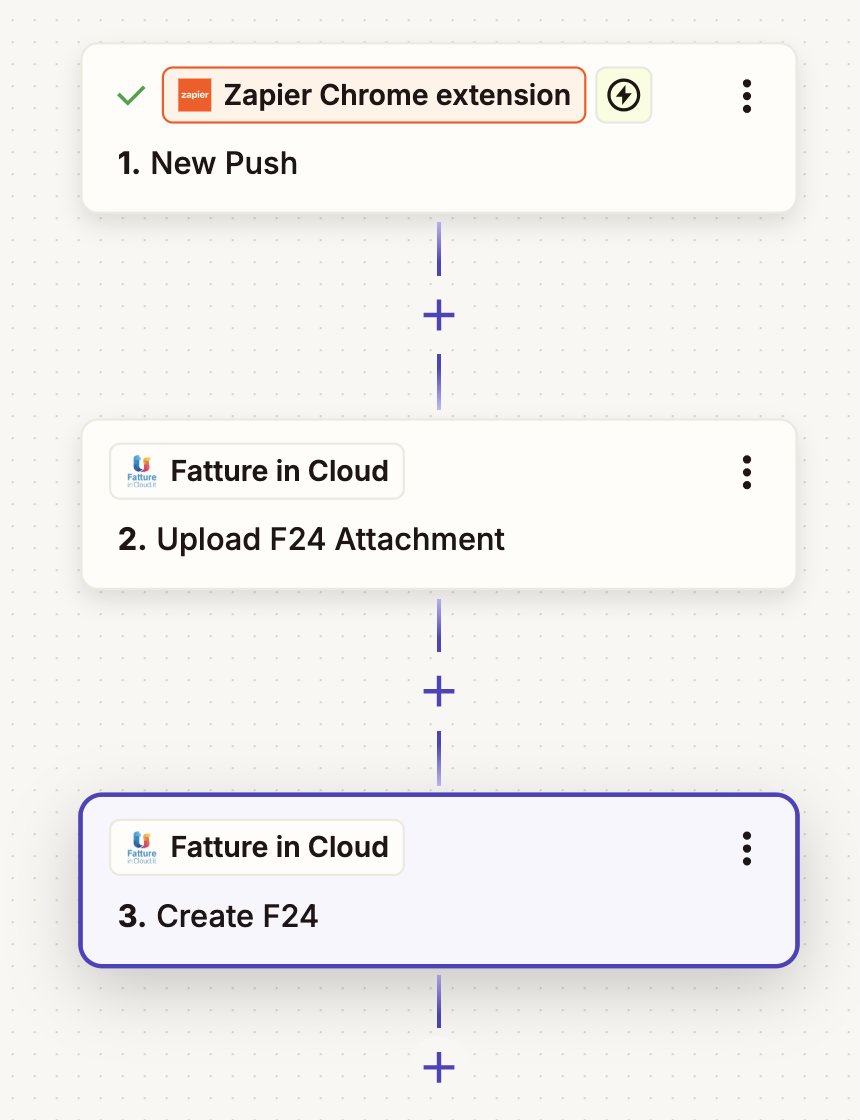
The upload of an F24 attachment in Zapier is done using the Upload F24 Attachment action. In your use case you'll need to integrate the action in your Zap workflow, but for the sake of this example we'll just create a simple Zap based on the Zapier Chrome Extension.
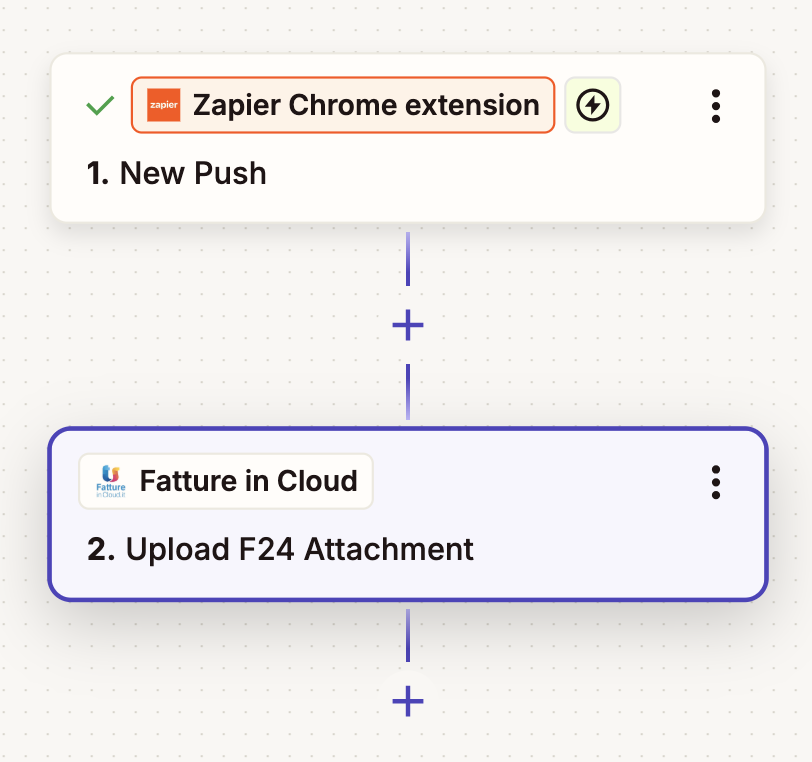
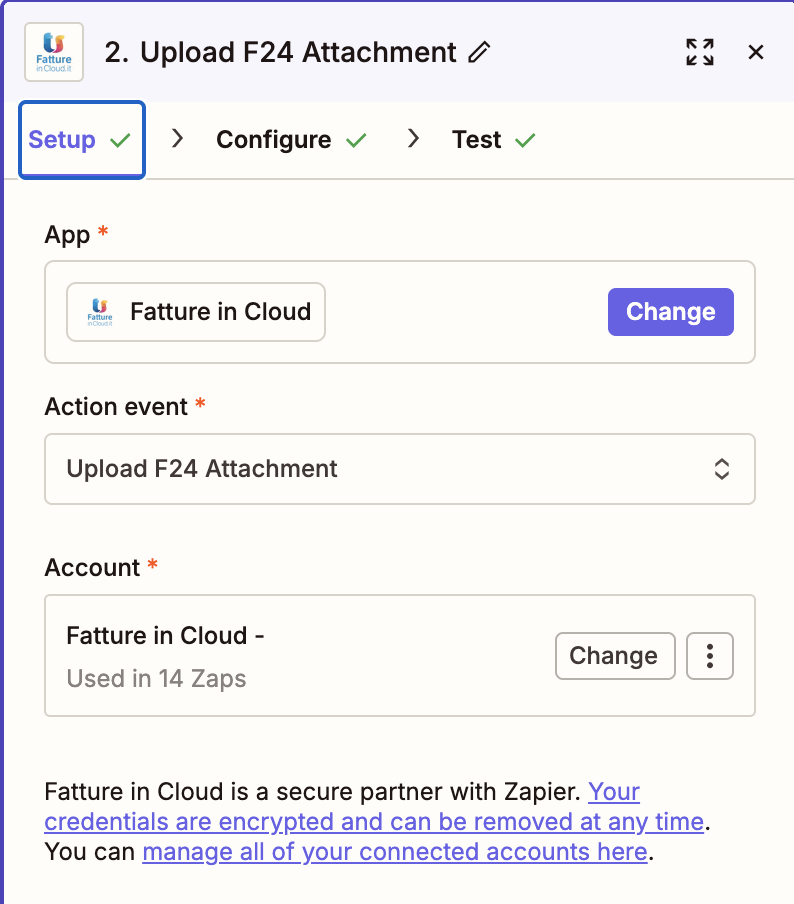
First, you need to add a Fatture in Cloud action to your Zap, then select the Upload F24 Attachment action event. You also need to connect your Fatture in Cloud account to Zapier if you haven't done it yet.
Then you need to configure the action by specifying the Company ID, the filename and the file to upload. As stated on the Zapier documentation, you can pass the file in three different ways:
- URL link: a publicly accessible URL pointing to the file to upload
- File Object: the actual content of the file obtained from a previous step in the Zap (you could for example use a file obtained from an email attachment using a Gmail action or trigger)
- Text File: the content of the file
In this example we'll use a URL link to upload a file from a publicly accessible URL. The other options are also valid, but the Fatture in Cloud APIs don't support .txt files so you'll most probably not be able to use the Text File option. The Zapier Action will take care of downloading the file from the provided URL and uploading it to Fatture in Cloud using a multipart/form-data request.
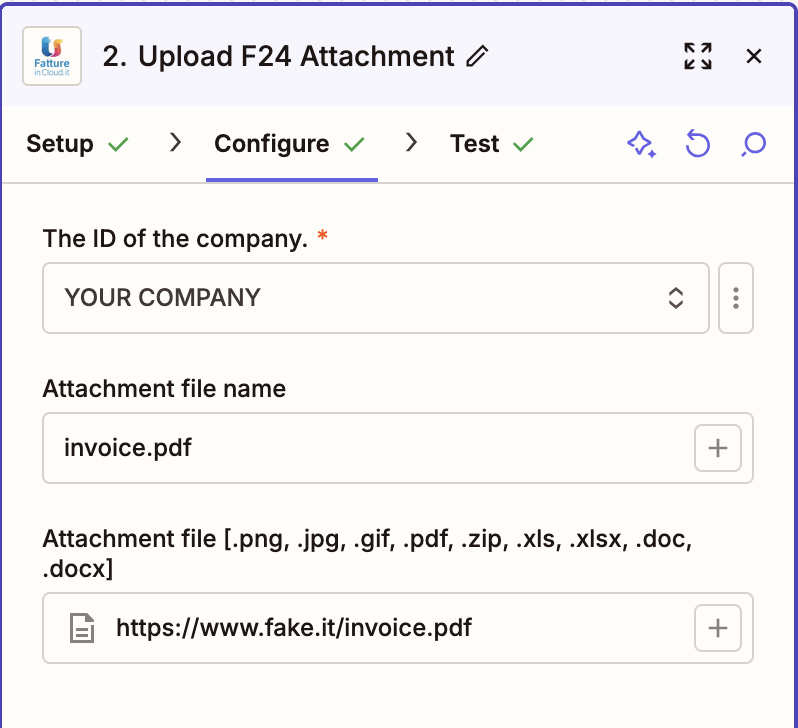
As you can see, we used a static URL value pointing to a sample PDF file. In your real use case, most probably you'll have obtained a value from a previous step in your Zap, for example from an email attachment or from a file stored in a cloud storage service.
After configuring the action, you can test it to verify that the upload works as expected.
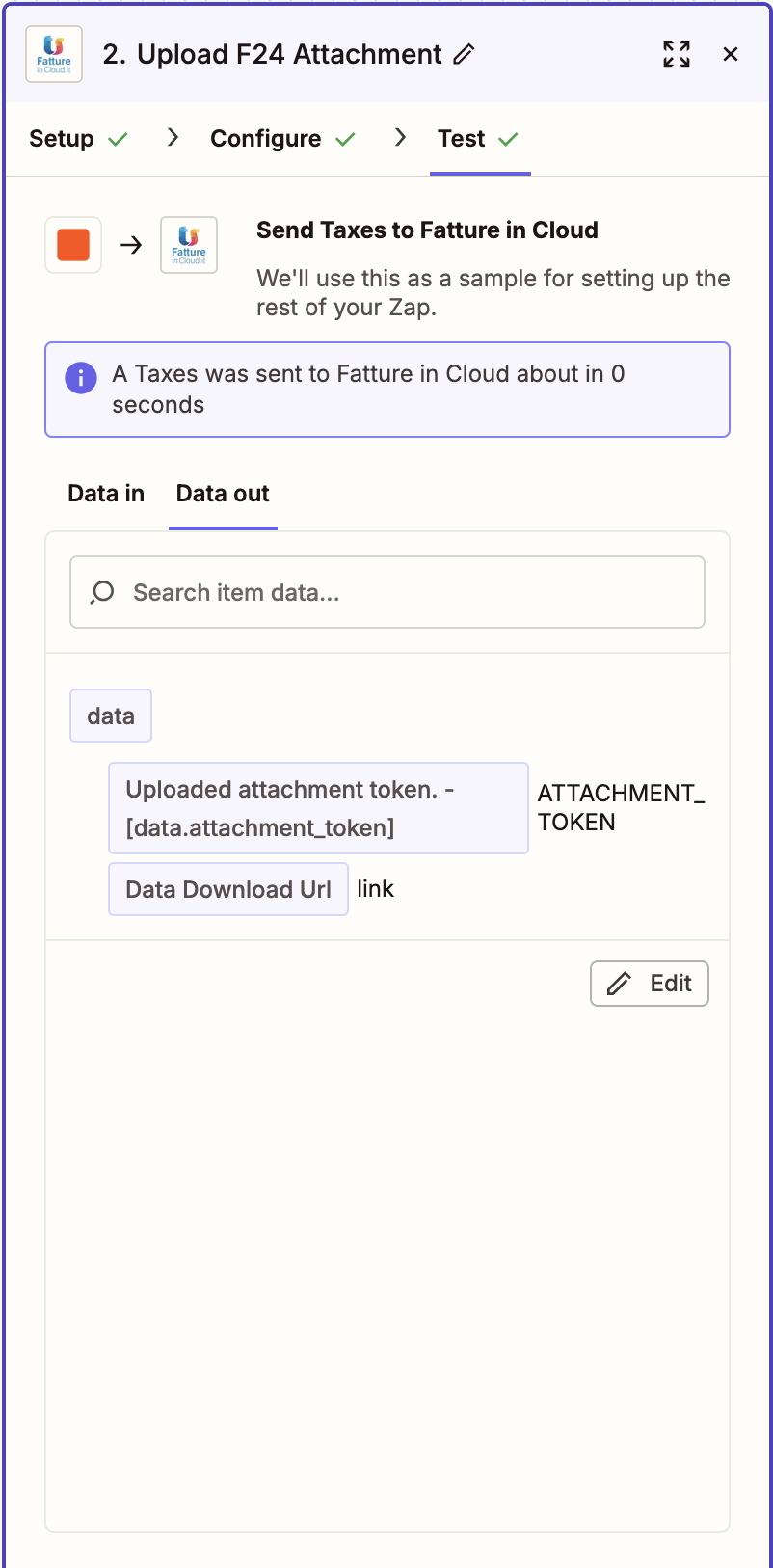
As you can see, the test was successful and the attachment token has been returned in the response. Once the test is completed successfully, you'll be able to use the attachment token returned by the action in the subsequent steps of your Zap; in our example we'll need to use it in the Create F24 Action.
📎 Attach the file to the document
When the upload is successful, you'll receive a response containing the attachment token:
{
  "data": {
    "attachment_token": "ATTACHMENT_TOKEN"
  }
}
Once you have the attachment_token, you can attach the file to your document (invoice, receipt, etc.) by including it in the appropriate API request when creating or updating the document.
For example, when using the Create F24 API method, you would include the attachment_token value in the request body, in the $.data.attachment_token field as follows:
{
  "data": {
    "amount": 840.36,
    "description": "PAGAMENTO IVA 2021",
    "due_date": "2021-12-31",
    "status": "paid",
    "payment_account": {
      "id": 111
    },
    "attachment_token": "ATTACHMENT_TOKEN"
  }
}
The file will then be associated with the document in Fatture in Cloud.